
Features
Enrollment management software, from first inquiry to first class
Every inquiry enters a pipeline, moves toward enrollment and becomes a student whose details are already filled in, ready to join a session.
Mixte Pro package free for 30 days · no credit card · no commitment
01
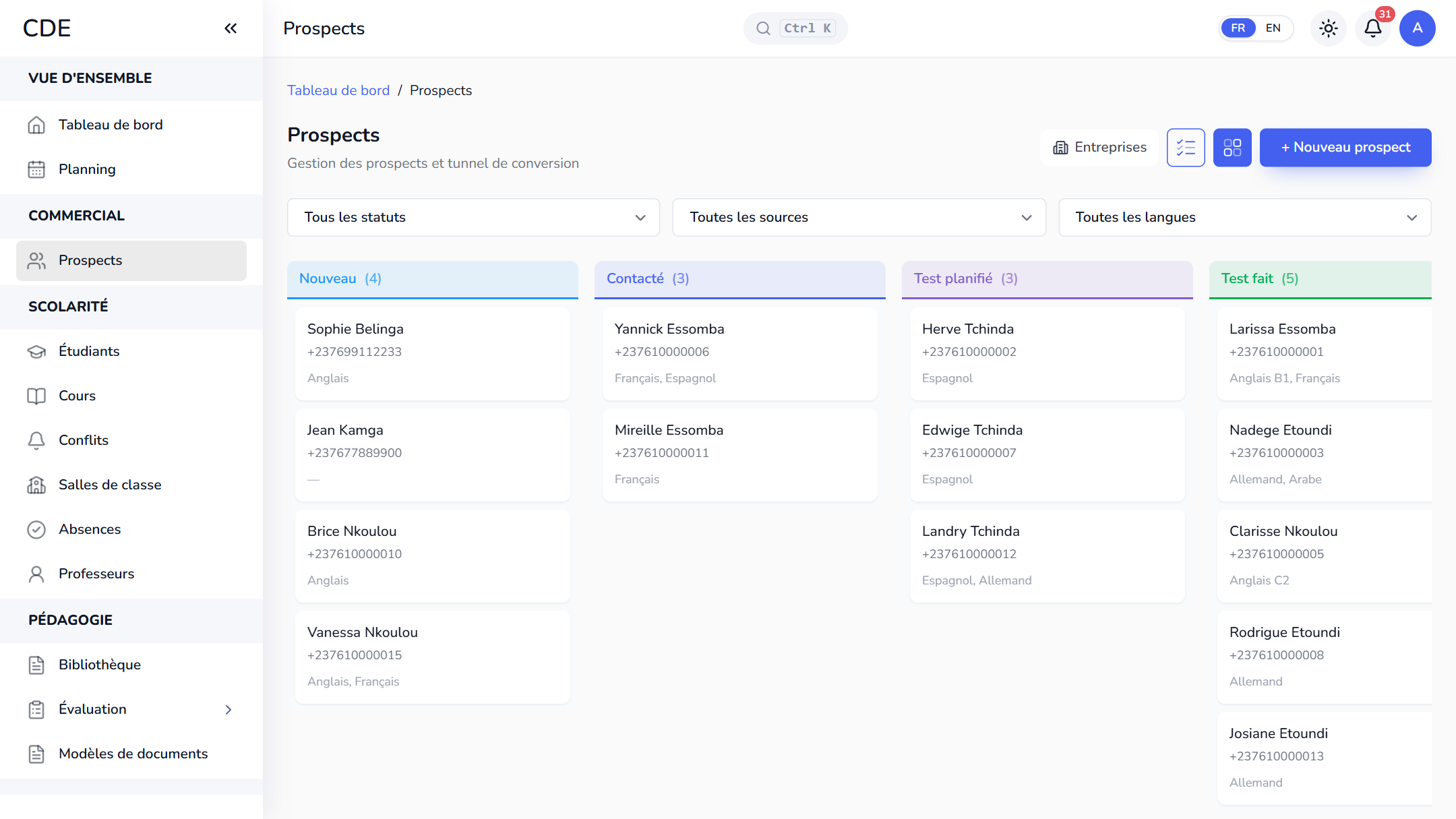
Every inquiry in a pipeline, all the way to enrollment
Facebook, WhatsApp, a walk-in, your website, a referral: each inquiry becomes a lead record with its source, the person following it up and a follow-up date. The lead moves from New to Contacted, Negotiation, then Enrolled, with Test scheduled and Test done stages if your center gives an online placement test. Table or Kanban, your choice. On the follow-up date, the lead shows up in the team's to-do list.
02
From lead to student in one click
The convert button on the lead record creates the student's record: name, phone, WhatsApp, email and level (declared or from the placement test) carry over, a registration number is assigned and the status becomes active. All that is left is to add the date of birth and the parents' contacts.
03
A form to place on your center's website
The administrator turns on a public form and places it on the center's website, as a direct link or an iframe. Visitors enter their name, phone number, the course they want and a message, then accept your privacy policy. They become a Website lead in the pipeline, and accounts with notifications turned on get an alert on their device. A hidden trap field, a minimum fill-in time and a submission limit keep robots out, with no captcha.
04
A quote accepted online, enrollment done
From the lead record, you build a quote: sessions, price, discount, VAT, validity date. It goes out with its PDF by email, and by WhatsApp or SMS once your accounts are connected. The lead accepts it online or signs it electronically; quotes and e-signature depend on your plan.
On acceptance, the student record is created, the student is enrolled in every session on the quote, their installment plan is set up at the agreed price and the lead moves to Enrolled.
05
Enroll in a session, within the available seats
You can enroll a student when creating them, from the Enrollments tab of their record, or from the session itself by searching for their name, number or phone. The list shows seats taken against capacity, for example 12/20: a full session can no longer be selected. Afterwards, the installment plan is created from the student's Finances page: up to 12 dated installments, registration fee included.
06FAQ
Frequently asked questions
Another question? An expert calls you back whenever suits you.
Which software should I use to manage enrollment at a training center?
A tool that follows the inquiry before and after enrollment: a lead pipeline, conversion to a student, enrollment in a session and payment in installments. Palatryx covers that chain, with a free trial and no credit card.
Can Palatryx receive inquiries from my website?
Yes. A public form, placed as a link or an iframe on your site, creates a lead in the pipeline every time it is submitted. Only the administrator turns it on, and visitors have no account to create.
How do I enroll students who are already in a spreadsheet?
Import them as a CSV file with the template provided: rows that need fixing are flagged before the import, and duplicate phone numbers or emails are skipped. Enrolling each one in a session is then done from their record.
07
See also
-
Student management
A complete record for every student: automatic registration number, finances, levels, documents, a student portal and Excel import. Free trial.
-
Online placement test
Send prospects a placement test link: automatic marking, and their estimated level lands on their record before you call back. Free trial.
-
Class scheduling
Time slots, classes created for the whole session, schedules by room, teacher or course, drag and drop and conflicts flagged up front. Free trial.
-
Payment management
A monthly cash journal, numbered receipts, installment plans, Mobile Money entries, traced refunds and a net result for your training center's payments.
Open your center in minutes.
Enroll your first students the same day. 30 days free on the Mixte Pro package, no credit card required.